Posts

Debug SSRS report in AX 2012

To debug classes, methods, tables and forms in AX, we simply mark the breakpoint on the code or write the keyword breakpoint . But when it’s come to SSRS report it needs few step to debug it, mentioned below 1) In DP class of the report, change SrsReportDataProviderBase to SrsReportDataProviderPreProcess in class declaration. 2) Change Temporary table property to Regular . 3) Change Temporary table property Created By to Yes 4) Change Temporary table property Transaction Id to Yes 5) Add the following line also in process report method of DP class tmpTable.setConnection(this.parmUserConnection()) Mark break point in the code and run the report. It will hit the break point now.

Get product variant in AX 2012 (X++)

Image
Get product variant in AX 2012 (X++)  Product variants are setup for product master to distinguish between the same product with respect to size, colors etc. For example, Bi-Cycle is the product master and its size and color can be different which are its variant. Product variant can be seen from: Product information management > Common > Released product Select any item and click on Released product variants. These variants can be fetched using following code through X++. Using Query Build Datasource: Query query =            new Query(); QueryBuildDataSource     qbds, qbdsDim; QueryRun                qr; InventDim                 InventDim; ItemId                   itemId  =  "10001" ; qbds = query.addDataSource( tableNum (InventD...

Create multi select company lookup in report dialogue using X++

Image
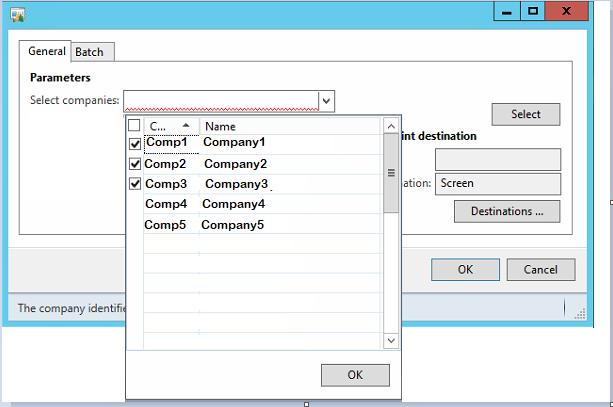
Create multi select company lookup in dialogue using X++ Let’s say we have a requirement to show multi select lookup on report dialogue box. Steps: 1) Create CONTRACT class with a company parameter in it. 2)   Create  UI BUILDER  Class to make multi select company lookup 3)   Get selected companies in Report DP class Let’s put some lights on the above steps. Assuming that we know the basic concepts of SysOperationFramework. Create CONTRACT class with a company parameter in it. Adding  SysOperationContractProcessingAttribute  in contract class will use controls modified in UI Builder class. Use LIST as a data type as we can have multiple selected companies. Code: [ DataContractAttribute,    SysOperationContractProcessingAttribute( classStr (TestReportUIBuilder)) ] class TestReporContract {      List     legalEntity; } Now add new method for company parame...